Views: 0 Author: Site Editor Publish Time: 2025-12-03 Origin: Site


Workplaces and home offices across the USA and EU have shifted strongly toward flexible, ergonomic setups. As displays have grown larger and desks have become multifunctional, the single monitor arm has emerged as a common upgrade beyond the traditional fixed monitor stand. Rather than simply elevating a screen, monitor arms unlock posture improvements, reclaim desk surface area, and create adaptable workstations that match modern work patterns.
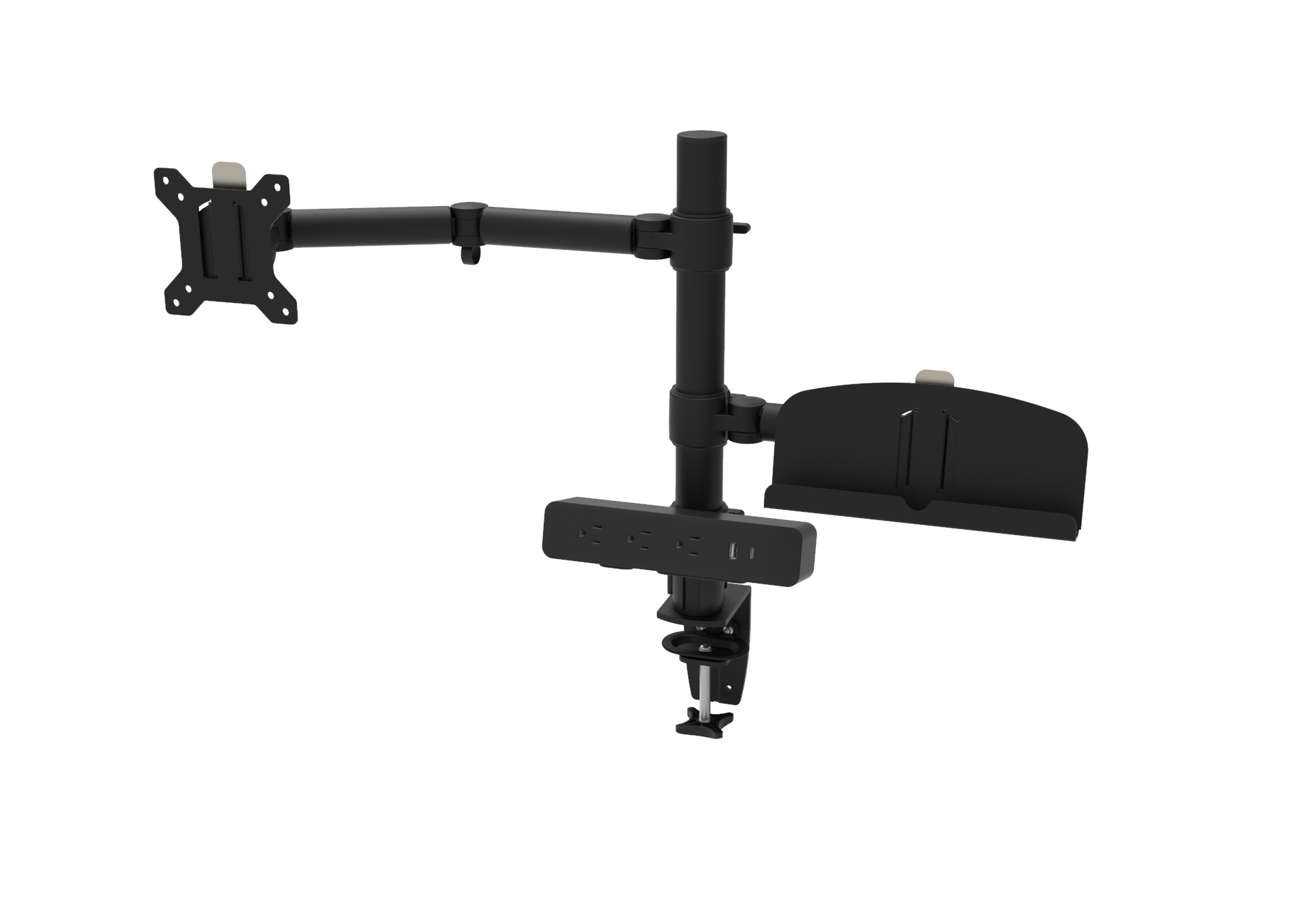
A single monitor arm is an articulated mounting system that attaches to a desk (via a clamp or grommet) or to a freestanding base, allowing the monitor to tilt, swivel, rotate, and adjust height smoothly. A fixed monitor stand—the factory base that typically ships with a monitor—is static or offers only limited tilt and height options. The primary difference is mobility and range: monitor arms offer continuous, precise positioning, while fixed stands provide a single, limited arrangement.
Proper monitor height and viewing angle reduce neck strain, shoulder tension, and eye fatigue. A single monitor arm makes it straightforward to position your screen so the top third of the display is at or slightly below eye level, and the viewing distance is optimal for your eyesight. Unlike fixed stands, arms let multiple users quickly reset the display height, which is essential in shared or hot-desking environments.
A monitor arm elevates the screen off the desktop, reclaiming floor area for keyboards, documents, or equipment. The freed space makes it easier to adopt ergonomic keyboard and mouse positioning and keeps the desktop uncluttered—beneficial both for small home desks and dense corporate workstations common across the USA and EU.
Monitor arms enable tilt, swivel, pivot (portrait ↔ landscape), and height adjustments. This flexibility is invaluable for tasks that require different orientations—coding in portrait mode, detailed design work, or collaborative review. For multi-modal workdays (video calls, design, spreadsheets), an arm lets you change the display position instantly without moving the whole monitor.
Many single monitor arms include integrated cable routing channels. Routing cables inside the arm reduces clutter and protects connectors from strain. The result is a cleaner, more professional-looking desk—an aesthetic that matters in client-facing offices and in the image-conscious home offices increasingly popular in the USA and EU.
Sit-stand desks are now common in modern offices. A quality monitor arm maintains screen height relative to the user when switching between sitting and standing postures, preserving ergonomic alignment. Some monitor arms are specifically rated for sit-stand motion; combined with a height-adjustable workstation, they enable seamless, healthy transitions throughout the day.
Investing in a single monitor arm can yield productivity improvements by reducing physical discomfort and enabling faster, more comfortable screen positioning. Over time, the ergonomic benefits can translate into fewer sick days and higher sustained productivity—an important consideration for both employers in the USA/EU and serious home workers.
Check the monitor's weight (including any adapters or hubs) and ensure the arm's rated load exceeds this weight.
VESA pattern (e.g., 75×75 mm or 100×100 mm) must match the monitor's mounting holes or use an adapter.
Clamp mount: easy to install, no drilling required—good for renters.
Grommet mount: more low-profile and stable for heavy screens when desk geometry allows drilling.
Freestanding base: best if desk edges or under-desk access are restricted.
Gas-spring: smooth, adjustable tension; preferred for frequent height changes.
Friction: simple and durable; may require more force to reposition.
Spring-based: economical but can lose tension over time.
Ensure the arm provides the tilt and rotation you need (e.g., ±90° swivel, portrait rotation). For multi-user setups, prioritize wide adjustment ranges.
Check desk thickness limits and whether the desk material (veneer, particleboard, solid wood) supports clamp or grommet mounting. For delicate surfaces, use protective pads or choose grommet mounting with underside reinforcement.
Choose reputable brands offering clear warranty terms (especially for commercial deployments in the USA/EU). Metal construction and sealed bearings typically indicate better durability.
Read the manufacturer's instructions and weight limits carefully.
For clamp mounts, position the clamp where the desk edge has internal support (frame or solid material).
For grommet mounts, verify underside clearance and check whether drilling affects the desk warranty.
Use proper tools and don’t over-tighten fasteners—excessive torque can crack surfaces.
Balance the monitor on the arm and set gas-spring tension per the monitor weight for safe, smooth movement.
Periodic checks: retighten bolts and check cable routing every 3–6 months for heavy-use setups.
Sagging or drift: usually fixed by adjusting tension or re-tightening pivot points. Consult the manual for tension adjustment procedures.
Scratches or surface wear: add protective pads to clamp surfaces or use desk protectors.
Warranty claims: keep purchase receipts and photos of installation in case of defects.
Home office worker (limited space): A single monitor arm with a clamp mount maximizes desk real estate and supports ergonomic posture without drilling.
Corporate office (shared desks): Grommet-mounted arms offer stability and a clean look for fixed stations; choose durable arms with warranty coverage.
Design and creative studios: Arms that support pivoting into portrait mode and heavy ultrawide monitors are ideal.
Sit-stand environments: Select gas-spring arms rated for dynamic height changes and verify compatibility with the desk's lifting mechanism.
A single monitor arm is more than an accessory—it's an ergonomic and productivity tool. Compared with a fixed monitor stand, an arm offers superior adjustability, better desk space utilization, cleaner cable management, and stronger long-term value. Whether you work from home in the USA, manage an office in the EU, or run a hybrid team, choosing the right monitor arm based on weight capacity, mount type, and mechanism will make your workspace healthier and more adaptable.
Q1: Will a single monitor arm fit my ultrawide or curved monitor?
A1: Many high-quality monitor arms support ultrawide and curved monitors, but you must match the arm’s weight rating and VESA compatibility to the screen. For very large or heavy displays, consider grommet mounting for extra stability.
Q2: Can I use a single monitor arm with a sit-stand desk?
A2: Yes—choose a monitor arm specifically rated for sit-stand use (gas-spring models are common). Ensure the arm’s range of motion complements the desk’s lift range and that the desk can structurally support the arm and monitor.
Q3: Is a clamp or grommet mount better for renters?
A3: Clamp mounts are generally better for renters because they require no drilling and are reversible. If a clamp is unsuitable due to desk edge design, consider a freestanding base or discuss drill permission with the landlord.